Trusted by 200+ businesses across the Americas




Guide for B2B sales teams
Complete guide to choosing the ideal CRM for your B2B sales team
Direct Answer: The best CRM for sales management is one that centralizes customer information, leads, and opportunities in a single place, without forcing you to use multiple tools to complete your sales process. Depending on your company type, the number of leads you handle, how frequently you send quotes, and the integrations you need, one CRM may be more suitable than another.
For distributors and B2B companies that send quotes frequently, traditional CRMs present a significant limitation: they don't allow you to create or send quotes directly from the customer record. This forces the team to work with Excel, Word, or other external platforms, duplicating information and losing visibility of the complete process.
Osmos solves this need with a CRM designed for quote-based sales. From the lead or opportunity record, you can generate a professional quote in minutes without leaving the system, with a preloaded catalog, automatic pricing, and real-time tracking. Additionally, when the client approves the quote, you can convert it to an order with one click, without re-entering data. This reduces errors, eliminates repetitive work, and allows the team to concentrate on selling, not managing different tools. Still deciding? See how CRM vs quoting software stacks up before you decide.
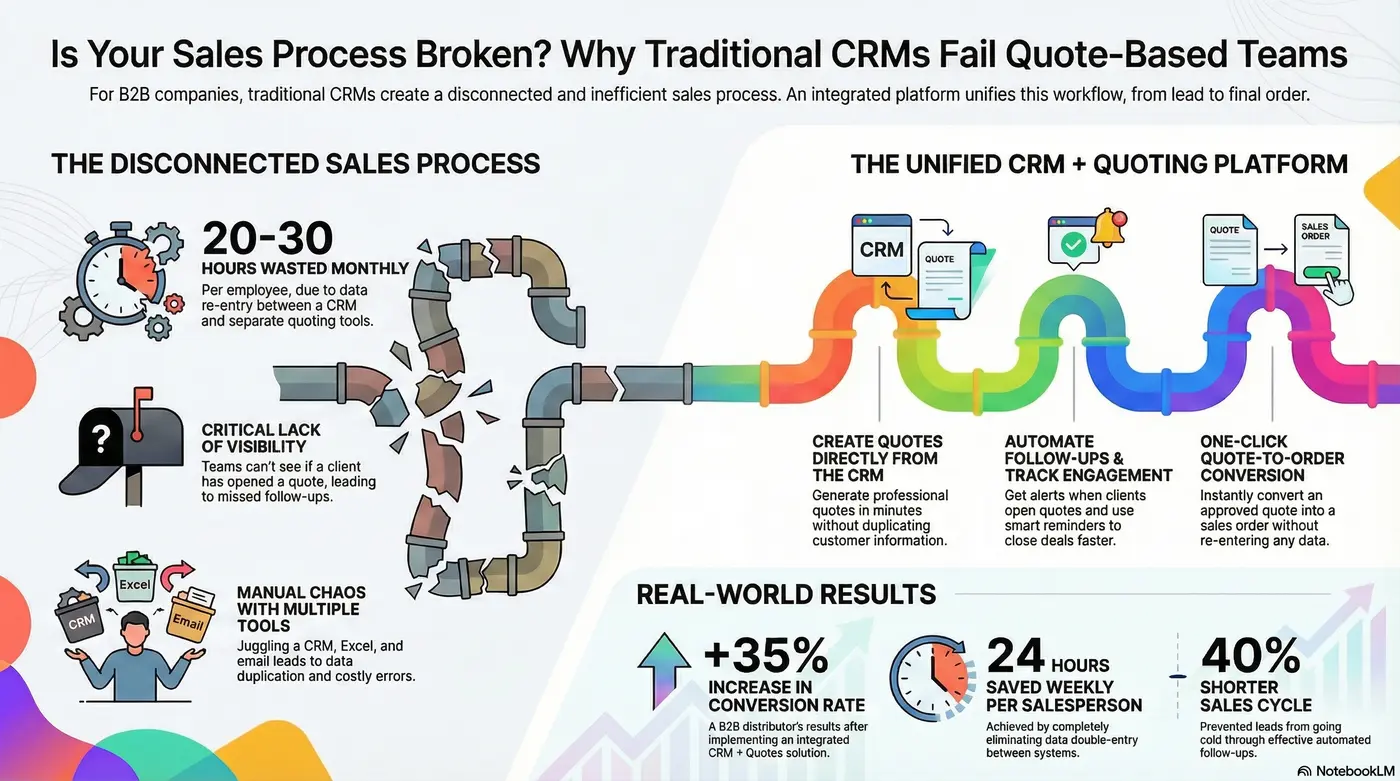
Visual guide to choosing your sales CRM
The problem
If your company manages leads and sends quotes frequently, you probably face these problems with generic CRMs or spreadsheets:
A specialized CRM for B2B sales eliminates these problems and unifies the sales process in a single platform.
What to look for
These functionalities make the difference between managing contacts and actually closing more sales:
Generate quotes directly from the customer record without duplicating information.
Smart reminders based on customer behavior.
Visualize all stages and move opportunities with one click.
Complete history of activities, notes, and pending items per customer.
Pipeline value, conversion rates, most quoted products, and closing times.
Approved quote → order with one click, without rewriting data.
Side-by-side
Analyze the real differences between types of CRM available in the market:
| Feature | Traditional CRMs | Contact CRMs | CRM + Quotes |
|---|---|---|---|
| Lead Management | ✅ Complete | ✅ Complete | ✅ Complete |
| Create Quotes | ❌ Requires another tool | ❌ Not available | ✅ Integrated |
| Automatic Follow-up | ~ Basic | ~ Manual | ✅ Activity-based |
| Convert to Order | ❌ Manual | ❌ Not available | ✅ 1 click |
| Quote Tracking | ❌ No | ❌ No | ✅ Real-time |
| Quote Reports | ❌ No | ❌ No | ✅ Complete |
| Ideal For | Marketing | Basic tracking | B2B Distributors |
Key Fact: A company that uses CRM + Excel for quoting loses 20-30 hours per month in double entry and platform switching.
Discover how Osmos CRM + Quotes accelerates your sales cycle.
Request a Demo30-day trial • No credit card • 1-hour setup • Support included
Why Osmos
Osmos is designed for companies that manage leads and send quotes daily. It's not just a CRM for recording contacts: it completes the sales cycle in a single platform.
Real Case: An industrial equipment distributor implemented Osmos CRM + Quotes. Before, they used a generic CRM for leads and Excel for quotes. Result after 5 months: +35% in conversion rate (went from 18% to 24%), savings of 24 hours weekly per salesperson (eliminated double entry), and 40% shorter sales cycle (automatic follow-up prevents leads from going cold).
Fit check
Questions
Less than 1 hour for initial setup. Complete migration can take 1-3 days with support.
Yes, via CSV/Excel or API integrations with HubSpot, Zoho, Pipedrive, and other CRMs.
No. The interface is intuitive and simple. We include personalized onboarding and training videos.
Yes, you can manage leads, opportunities, and create quotes from any mobile device or tablet.
Yes, via native API or through n8n which allows connecting with 500+ applications.
From a lead or opportunity, you select products from your catalog, quantities are calculated with the customer's price list, add conditions, and send the quote in minutes with a unique link.
Dashboard with complete pipeline, conversions, most quoted products, salesperson performance, closing times, forecasts, and team activity. All exportable to Excel.
Plans starting at $29 USD per user per month. Advanced plan $49 USD includes complete automations, reports, and integrations. 30-day trial without credit card.
Yes. You can use the complete CRM and activate the quotes module when you need it, without changing systems.
Takeaways
The best CRM for sales management is one that simplifies the team's work and unifies the entire sales process. For B2B companies that send quotes, a traditional CRM only solves half the problem.
Osmos offers the best return on investment because:
More than 200 companies in Latin America already operate their complete sales cycle with Osmos. The investment pays for itself in the first month by simply closing 1-2 additional sales that were previously lost due to lack of follow-up.
Get started
Schedule a demo and create your first quote in less than 10 minutes.
30-day trial • Migration included • No installations