Trusted by 200+ businesses across the Americas




Quote automation guide
Complete guide to automating your quotes, reducing operational overhead, and increasing sales without hiring more staff
Direct Answer: Automating quote creation means replacing manual tasks —product selection, calculations, sending, tracking, and status updates— with automatic processes that work on their own. A specialized system allows you to generate professional quotes in minutes, apply prices and discounts automatically, send quotes via web link, and track in real-time without team intervention.
Modern platforms include preloaded catalogs, customizable templates, automatic price lists, instant calculations, and integrations with accounting systems. However, the true advantage lies in the Automations module, which executes internal actions when detecting events such as: a new request, an opened quote, an expired quote, or an approved quote. Learn more about sales quote automation tools that handle follow-up automatically.
For distributors and B2B companies with high quote volume, platforms like Osmos automate the entire commercial cycle: request, creation, sending, tracking, conversion, and post-sale. The result is a faster, more organized and scalable process, capable of handling more volume without increasing operating costs.
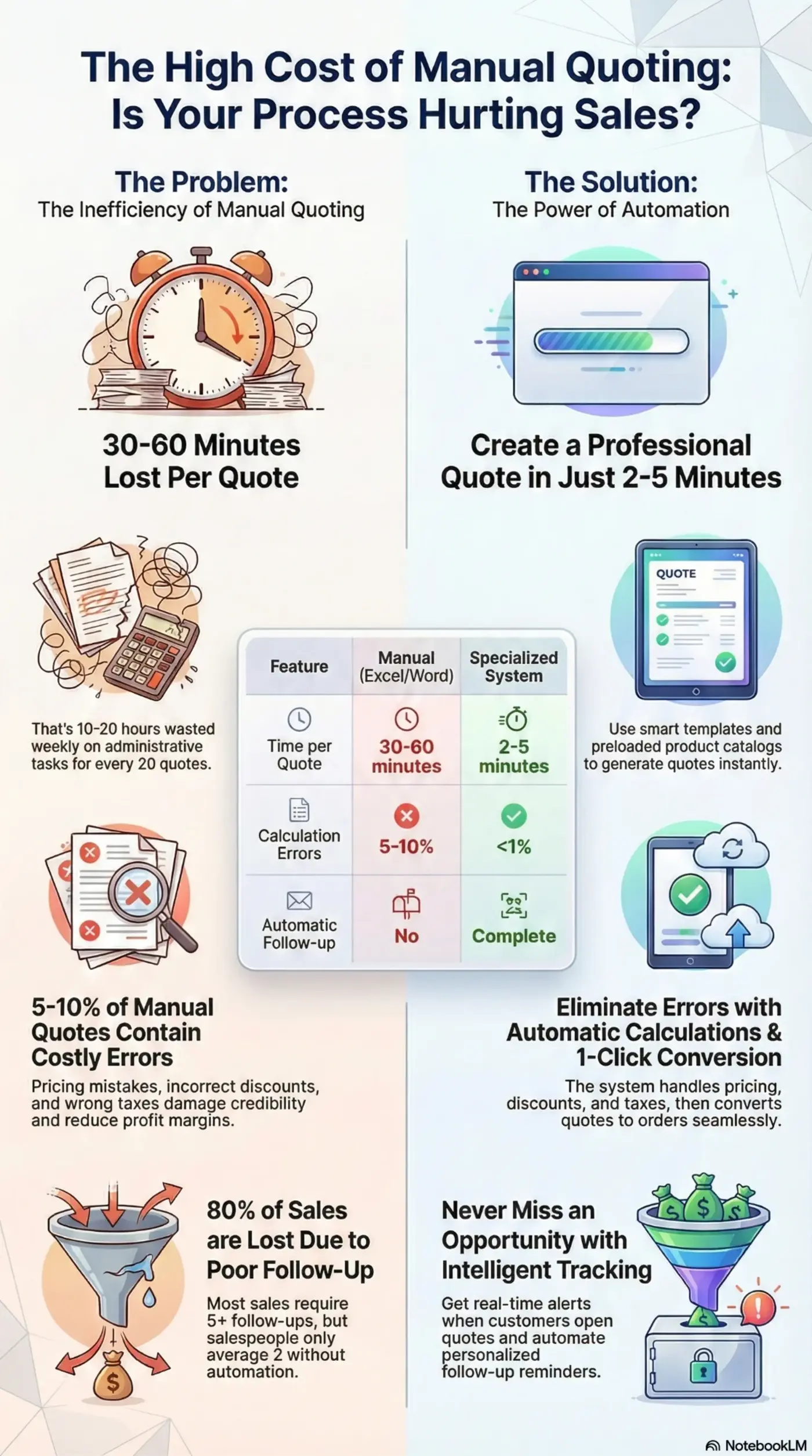
Visual guide to automating your quoting process
The real cost of manual quoting
If your company sends more than 15 quotes per month, the manual process is costing you money, time, and lost sales. Manual quote creation generates multiple problems that directly impact your profitability and growth.
Without internal automations, each salesperson must manually:
These administrative tasks consume between 30% and 40% of your team's commercial time. With automation, all these actions execute themselves according to predefined rules.
An automated system eliminates these bottlenecks and transforms your sales process from reactive to proactive, from manual to intelligent, from slow to instant.
Feature checklist
Not all automation systems are equal. A truly effective system must include these essential capabilities that make the difference between simply digitizing the process and truly transforming your sales operation.
Smart templates with preloaded product catalog. Select items, adjust quantities, and generate professional quote in 2-3 minutes.
The system applies customer-specific pricing, calculates volume discounts, adds taxes correctly, and updates totals in real-time. Zero math errors.
Automatically handles different prices based on customer type, purchase volume, season, or region. The system selects the correct list without manual intervention.
Real-time notifications when the customer opens, reviews, or shares your quote. You know exactly when to follow up to maximize closing probability.
Automatic reminders to customers at optimal moments. Personalized sequences based on behavior. The system follows up for you, you never forget an opportunity.
Convert approved quote to order with 1 click. Then order to invoice. Integration with accounting systems and CRM. Data flows automatically without rewriting anything.
Rules that trigger automatically based on events: automatic salesperson assignment, internal notifications, task creation, status updates, pipeline movements. Team works more organized without touching a single button.
Real comparison
The method you use to create quotes determines how much you sell, how fast you grow, and how much time you waste on administrative tasks. This comparison shows real differences in efficiency, accuracy, and results.
| Feature | Excel/Word | General CRM | Specialized System |
|---|---|---|---|
| Time per Quote | 30-60 minutes | 15-30 minutes | 2-5 minutes |
| Calculation Errors | ❌ 5-10% | ~ 2-5% | ✅ <1% |
| Automatic Follow-up | ❌ No | ~ Basic | ✅ Complete |
| Multi-Price Lists | ❌ Manual | ~ Limited | ✅ Automatic |
| Convert to Order | ❌ Rewrite everything | ~ Sometimes | ✅ 1 click |
| Customer Tracking | ❌ No | ❌ No | ✅ Real-time |
| Internal Automations | ❌ No | ❌ No | ✅ Yes |
| Scalability | ❌ Low | ~ Medium | ✅ High |
| Ideal For | 1-10 quotes/month | Contact management | 50+ quotes/month |
Real ROI: A company with 20 weekly quotes saves 12-18 hours/week. That represents $1,200-$1,800 USD/month in avoided operational costs.
Get started
Discover how automation can transform your sales process
30-day free trial • No credit card required • Implementation in less than 1 hour • Full support included
How it works
Osmos is not an adapted CRM or an enhanced spreadsheet. It's a platform designed specifically to send quotes faster and automate the activities that consume your commercial team's time. It's built from the ground up for distributors and B2B companies that need to grow without increasing operating costs.
Osmos's true differentiator is its Automations module: a workflow system that executes tasks for you when a specific event occurs. This frees your team from repetitive administrative tasks and ensures nothing is forgotten.
Result: Your operation becomes more organized, predictable, and less dependent on human memory. The team focuses on selling, not managing processes.
Complete Automation Real Case:
An industrial equipment distributor sent 25 weekly quotes. Each quote took 45 minutes to create (18.75 weekly hours). Additionally, each salesperson spent 8 hours weekly on administrative tasks: manual follow-ups, updating statuses, creating reminders, moving opportunities.
With Osmos:
That time allowed them to increase volume to 60 weekly quotes without hiring additional staff. With better automatic follow-up, their conversion rate rose from 22% to 31%.
Final result: +35% in sales in 5 months with the same team.
Is this for you?
Quote automation isn't for everyone. It works best when your business meets certain specific criteria. Evaluate if your company fits the ideal profile or if other solutions would be more appropriate.
Questions
With Osmos, implementation takes less than 1 hour. Set up product catalog, basic templates, and main contacts. You can send your first automated quote the same day. No complex installations or month-long projects.
No. If you can use WhatsApp or send emails, you can use Osmos. The interface is intuitive and designed for salespeople, not programmers. Includes video tutorials and support during implementation.
Osmos allows you to fully customize your templates. You can keep your current format, add your logo, corporate colors, specific terms and conditions. Your customers will see quotes with your brand, not generic templates.
No. Your customers access quotes through a direct link. They can view, download, or share without creating an account or registering. Simple and professional experience.
Osmos automatically applies the correct list based on rules you configure: customer type, purchase volume, region, season. You can have unlimited price lists and the system selects the appropriate one without manual intervention.
Yes. Osmos integrates with most accounting systems through direct API or using n8n (integration platform). It also exports data in formats compatible with any system: Excel, CSV, XML.
You can create new versions of quotes already sent. The customer receives notification of new version. The system maintains complete history of all versions for future reference.
Osmos has plans starting at $29 USD per user per month. Considering you save 10-15 hours monthly per user (value of $800-$1,200 USD), ROI is immediate from operational efficiency alone, not counting the increase in sales from faster response and automatic follow-ups.
Yes. You can create automations based on events such as: new quote, opened, approved, expired, or no response. You can configure actions like sending emails, creating tasks, changing statuses, reassigning salespeople, moving opportunities in the pipeline, and more. The Automations module requires no code and allows you to clone, edit, activate/deactivate rules according to your business needs.
Takeaways
Automating quote creation isn't just making them faster: it's eliminating repetitive tasks, ensuring consistent follow-ups, and giving your team more time to sell. With Osmos and its Automations module, you can scale without hiring more staff, reduce errors, and respond faster than your competitors.
The benefits are measurable and proven:
For distributors and B2B companies sending 50+ monthly quotes, a specialized system like Osmos offers the best return on investment. More than 200 companies in Latin America have already automated their quotes and report tangible results in the first 60 days.
Automation pays for itself simply by closing one additional sale per month. Everything else—time saved, errors eliminated, processes optimized—is pure profit.
Step by step
If your sales reps are still building quotes manually in Excel or copying line items from an email into a spreadsheet, you already know the problem: it takes too long, things get missed, and follow-up never happens consistently.
Here's the good news — automating your quote creation process doesn't require a big tech overhaul. For most small distributors and product/service businesses, four steps cover the whole workflow. (If you're still comparing tools, start by choosing the best quoting system for your business.)
Instead of waiting for an email or a phone call, embed an e-quote widget on your website or Facebook page. Customers select the products or services they want, and the request lands directly in your quoting tool — no back-and-forth, no transcription errors.
Pull from your product catalog, add images and line-item pricing, and adjust quantities. A quote that used to take 20–30 minutes can be ready in under 60 seconds when your catalog is already loaded and the request came in pre-filled.
Not a PDF attachment. Not an email with a price buried in the body. A clean, image-rich quote your customer can review and approve — on any device.
Set rules once: if the quote isn't opened in 48 hours, send a reminder. If it's opened but not approved, follow up with a nudge. Your reps stay focused on active deals, not chasing cold quotes.
This is exactly what Osmos is built to do — purpose-built quoting automation for distributors and businesses that send 100 or more quotes a month. Not a generic CRM, not a proposal builder — just a faster, more consistent way to quote and close.
Get started
Personalized demo based on your industry and quote volume
1-hour implementation • No complex installations • Data migration included • Complete training