Trusted by 200+ businesses across the Americas




Buying guide
Complete guide to choosing the most suitable quoting solution for your business
Direct Answer: The best quoting system for your business is one that drastically reduces quote creation time, automates follow-ups, and helps you close sales faster. Depending on the volume of quotes your company sends, the level of customization your products and services require, your sales team size, and the functionalities and reports you need, one system will be more suitable than another.
For distributors and B2B companies that send multiple quotes daily, specialized solutions like Osmos enable quoting up to 10 times faster than traditional methods, automate customer follow-up, and help you close more sales consistently.
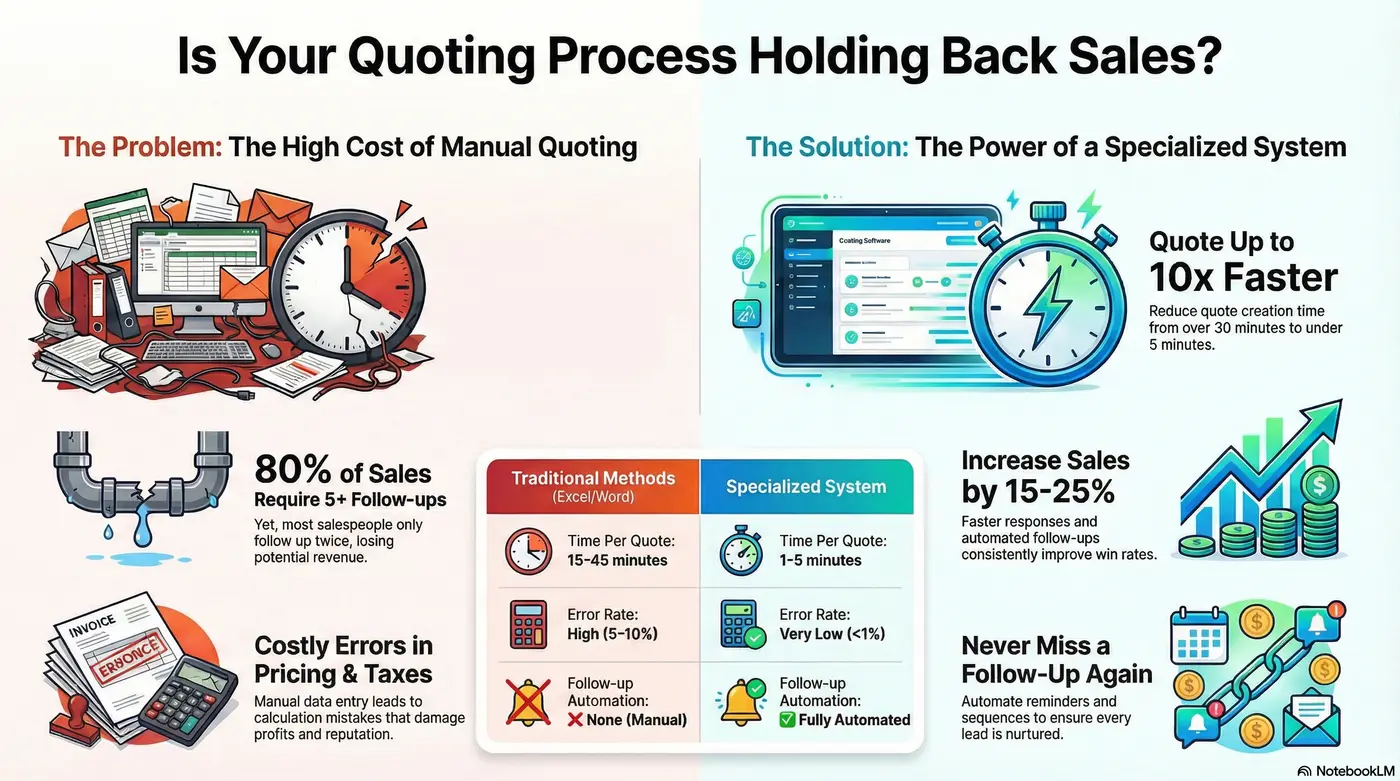
Visual guide to choosing your quoting system
Common problems
If your business sends quotes frequently, you probably face these common problems:
A specialized system eliminates these bottlenecks and allows your team to focus on selling, not administrative tasks.
Feature checklist
Not all quoting systems are equal. These features make the difference in sales and efficiency:
Templates with preloaded products. From 30 minutes to 3 minutes per quote.
Prices, discounts, and taxes without errors.
Notifications when the client opens or reviews your proposal.
Automatic reminders that prevent lost sales due to forgetting.
Sales, conversion rates, performance by salesperson, featured products, forecasts, and more.
Adapt your templates to your needs and style.
Compare your options
Analyze the real differences between available options:
| Feature | Excel/Word | General CRM | Specialized System |
|---|---|---|---|
| Time per Quote | 15-45 minutes | 10-30 minutes | 1-5 minutes |
| Automatic Calculations | ❌ Manual | ~ Limited | ✅ Complete |
| Tracking | ❌ No | ~ Basic | ✅ Automated |
| Automations | ❌ No | ~ Partial | ✅ Complete |
| Convert to Order/Invoice | ❌ Rewrite everything | ~ Not always | ✅ 1 click |
| Error Rate | High (5-10%) | Medium (2-5%) | Very low (<1%) |
| Ideal For | 1-5 quotes/week | Contact management | Companies that quote daily |
Key fact: A company that sends 20 quotes weekly saves between 10 and 15 hours with a specialized system, equivalent to $800-$1,200 USD monthly in payroll costs.
Get started
Discover how Osmos can accelerate your sales process.
30-day trial • No credit card • Start sending quotes today • Support included
Why Osmos
Osmos is designed for businesses that send multiple quotes daily and need to close more sales without increasing staff.
Real case: An industrial equipment distributor reduced quote time from 40 to 4 minutes. Went from 15 to 70 quotes per week per salesperson. Result: +28% in sales in 4 months.
Fit check
Questions
There's no complex implementation. Setting up your account takes less than 1 hour: templates, catalog, contacts. You can send quotes instantly.
No. If you know how to use WhatsApp or Gmail, you can use Osmos.
Yes, via API or n8n. Ask about your specific system.
No. They access via a direct link.
Yes, it works perfectly on mobile and tablet.
Osmos handles them automatically based on customer or volume.
Plans starting at $29 USD per user per month.
Yes, it has optional integrated CRM.
Takeaways
The best quoting system is one that your team actually uses, that pays for itself in time savings, and that increases sales rather than just automating processes.
For distributors and B2B companies that send multiple quotes daily, a specialized system like Osmos offers the best return on investment:
More than 200 companies in Latin America already use Osmos to work less and close more. The investment pays for itself by simply closing one additional sale.
Why it matters
Every hour a sales rep spends copy-pasting line items into a spreadsheet is an hour not spent closing. For businesses that send 100+ quotes per month — distributors, industrial suppliers, medical equipment companies, event rental firms — the quoting system you choose is not a back-office detail. It directly determines how fast you respond to prospects, how consistently your team follows up, and how many deals die in silence because nobody remembered to check in.
The best quoting system does four things well: it captures quote requests without friction, lets your reps build accurate, professional quotes in seconds, sends those quotes automatically, and then follows up with prospects based on rules you set — not on whether your rep remembered. If your current tool does not do all four, you are leaving money on the table.
Buying checklist
Before comparing tools, align on the features that actually move the needle for small and mid-sized sales teams. It also helps to learn how quotes differ from estimates, proformas, and invoices before you choose:
1. Speed of quote creation. A quote that takes 25 minutes to build in Excel can take under 60 seconds in a purpose-built quoting system. Look for a tool with a product catalog, image-rich line items, and reusable templates.
2. Quote request capture. The best systems include an embeddable widget — sometimes called an e-quote or configurator — that lets website visitors or social media followers self-select the products or services they want quoted. This eliminates the back-and-forth email thread that delays quote creation by days.
3. Automated follow-up. Research consistently shows that 80% of sales require five or more follow-up touches, yet most reps give up after one or two. A quoting system with built-in automation sends follow-up emails on a schedule you define, keeping your quote top of mind without requiring manual effort.
4. CRM integration or built-in contact management. Every quote is attached to a contact. If your quoting tool does not track contact history, you are flying blind on pipeline visibility.
5. Pricing transparency and scalability. Startup teams need tools that are affordable at low volume but scale as the business grows — without surprise per-seat fees that punish success.
Compare tools
Best for: Small-to-mid-sized distributors and product/service hybrid businesses sending 100+ quotes per month.
Osmos is purpose-built for quoting — not proposals, not generic pipelines. It combines an e-quote capture widget, a fast multi-line-item quote builder with product images and pricing, automated follow-up sequences, and a lightweight CRM layer into one tool. The result is a complete quote-to-close workflow without the overhead of an enterprise platform.
Quotes that previously took 20–30 minutes to build in Excel can be sent in under 60 seconds. Follow-up emails go out automatically based on rules you configure — no rep needs to remember to check back. And because every quote is tied to a contact record, your sales manager always knows where every deal stands.
Pricing: Pay As You Go at $5/month base + $1 per new contact (unlimited quotes); Essential plan includes CRM, quoting, and invoicing; Pro plan adds automations, sales orders, and payment tracking. Pricing is per user per month.
Ideal industries: Industrial supplies (spare parts, machinery, pulleys), medical supplies, event rental, security systems installation, and any business that bundles products with services.
Limitations: Osmos is not a long-form proposal builder — if your sales process requires narrative-heavy documents with custom branding blocks and e-signatures on multi-page PDFs, a tool like PandaDoc may be a better fit. Osmos is built for speed and volume, not document design.
Best for: Businesses that sell through long-form proposals — consulting firms, agencies, SaaS companies.
PandaDoc is a polished proposal and document tool with strong e-signature functionality. It handles brand-consistent document creation well and integrates with Salesforce, HubSpot, and other enterprise CRMs. However, it is not optimized for high-volume, multi-line-item quoting. If you are a distributor sending 200 part-number quotes per month, PandaDoc's document-centric model creates friction rather than removing it. Pricing starts around $19/user/month on the Essentials plan.
Verdict vs. Osmos: PandaDoc wins on document design and e-signatures. Osmos wins on speed, line-item quoting volume, and built-in follow-up automation for product-based businesses.
Best for: Companies already running HubSpot CRM who want basic quote functionality.
HubSpot includes a quotes tool inside its Sales Hub, but it is secondary to its CRM and marketing features. Quote customization is limited compared to dedicated quoting tools, and advanced features like automated follow-up sequences require a higher-tier paid plan. For teams already invested in the HubSpot ecosystem, the quotes module is convenient. For teams whose primary need is fast, accurate quoting, it is under-powered. Pricing for Sales Hub with quotes starts at $45/month for two users; meaningful automation requires the Professional tier at $450/month.
Verdict vs. Osmos: HubSpot wins if you need a full marketing automation suite bundled with your CRM. Osmos wins if quoting speed, capture, and follow-up automation are your primary requirements — at a fraction of the cost.
Best for: Mid-market agencies and service businesses creating complex, designed proposals.
Proposify focuses on the visual design of proposals: drag-and-drop templates, approval workflows, and detailed analytics on how prospects interact with your document (which sections they read, how long they spent). This is valuable for high-touch sales cycles. It is less relevant for distributors sending product quotes where the priority is accuracy and response speed, not animation and engagement tracking. Pricing starts at $49/user/month.
Verdict vs. Osmos: Proposify is a premium tool for visually complex proposals. Osmos is a volume quoting tool for businesses that need to send fast, accurate, image-rich product quotes and close deals with automated follow-up.
Not a quoting system — but worth addressing directly.
The majority of SME sales teams still build quotes manually in spreadsheets. The problems are well-documented: formulas break, reps use outdated price lists, quotes go out inconsistently formatted, and follow-up depends entirely on individual rep discipline. There is no audit trail, no pipeline visibility, and no automation. For businesses sending fewer than 10 quotes per month with a single sales rep, a spreadsheet may be adequate. For anyone sending more volume with a team of two or more reps, the cost of the chaos — in lost deals, wasted time, and inconsistent customer experience — quickly exceeds the cost of purpose-built software.
Decision framework
Use these three questions to narrow your decision:
1. What is your primary output — a document or a quote? If your sales process culminates in a multi-page narrative proposal with custom branding, PandaDoc or Proposify will serve you better. If your sales process culminates in a line-item price list with product images and totals, you need a quoting tool like Osmos.
2. How many quotes does your team send per month? Under 20 quotes per month: a basic tool or even a spreadsheet template may suffice. 20–100 quotes per month: a dedicated quoting system pays for itself quickly in time saved. Over 100 quotes per month: automation becomes essential — both for quote creation speed and for follow-up sequences.
3. Do you need follow-up automation built in, or will you rely on a separate tool? If your CRM handles follow-up, integration matters more than native automation. If you want one tool that captures, quotes, sends, and follows up — Osmos is built for that exact workflow without requiring a separate CRM subscription.
The math
If a sales rep earns $3,000 per month and spends 30% of their time building and following up on quotes manually, you are spending roughly $900 per month per rep on a process that software can handle. Multiply that by a team of five reps and you are paying $4,500 per month in labor for a workflow that a $50/month quoting system can automate. That is not a technology investment — that is a straightforward cost reduction with a closed-deal upside attached.
Fast quotes also win more business independent of price. Studies on sales response time consistently show that the first vendor to respond to a quote request wins the deal at a disproportionate rate. An e-quote capture widget on your website combined with a template-based quote builder means your rep can respond in minutes instead of hours — before the competitor who is still building their spreadsheet has even started.
Who it's for
Osmos is designed for businesses that live in the middle of the market: too large and too fast-moving for spreadsheets, but not the right fit for the enterprise overhead of Salesforce or the document-design focus of PandaDoc. Typical Osmos customers include:
Next step
The fastest way to know if a quoting system fits your workflow is to run a real quote through it. With Osmos, you can set up your product catalog, build a quote, and send it in your first session — no implementation consultant required. The e-quote widget can be embedded on your website or Facebook page the same day, so you start capturing quote requests from prospects without any manual intake process.
If you are currently managing quotes in Excel, the benchmark is simple: time how long it takes to build your next quote from scratch. Then run the same quote in Osmos. The difference is your per-quote time savings. Multiply by your monthly quote volume and you have the ROI calculation in under ten minutes.
Get started
Personalized demo based on your business type.
30 days free • No installation • Support included