Trusted by 200+ businesses across the Americas




Category comparison
Complete guide to understanding what each tool solves and how to unify your sales process
Direct Answer: A CRM is built to manage relationships and opportunities: it records prospects, contacts, companies, activities, pipeline stages and follow-up. Quoting software is built to create and send quotes quickly and accurately: templates, catalog, pricing, discounts, taxes, versions, approval and conversion to order/invoice (depending on the system).
If your team sells B2B, you almost always need both because selling isn't just "following prospects" and it's not just "making PDFs": money is made when you connect follow-up + commercial document + status control (sent, viewed, approved, expired, won/lost) and turn it into a repeatable flow.
The ideal isn't having two isolated tools, but a unified process: Prospect → Opportunity → Quote → Approval → Invoice/Payment (according to your operation). At Osmos, the focus is precisely that: quote fast, standardize documents and don't lose sales due to lack of follow-up.
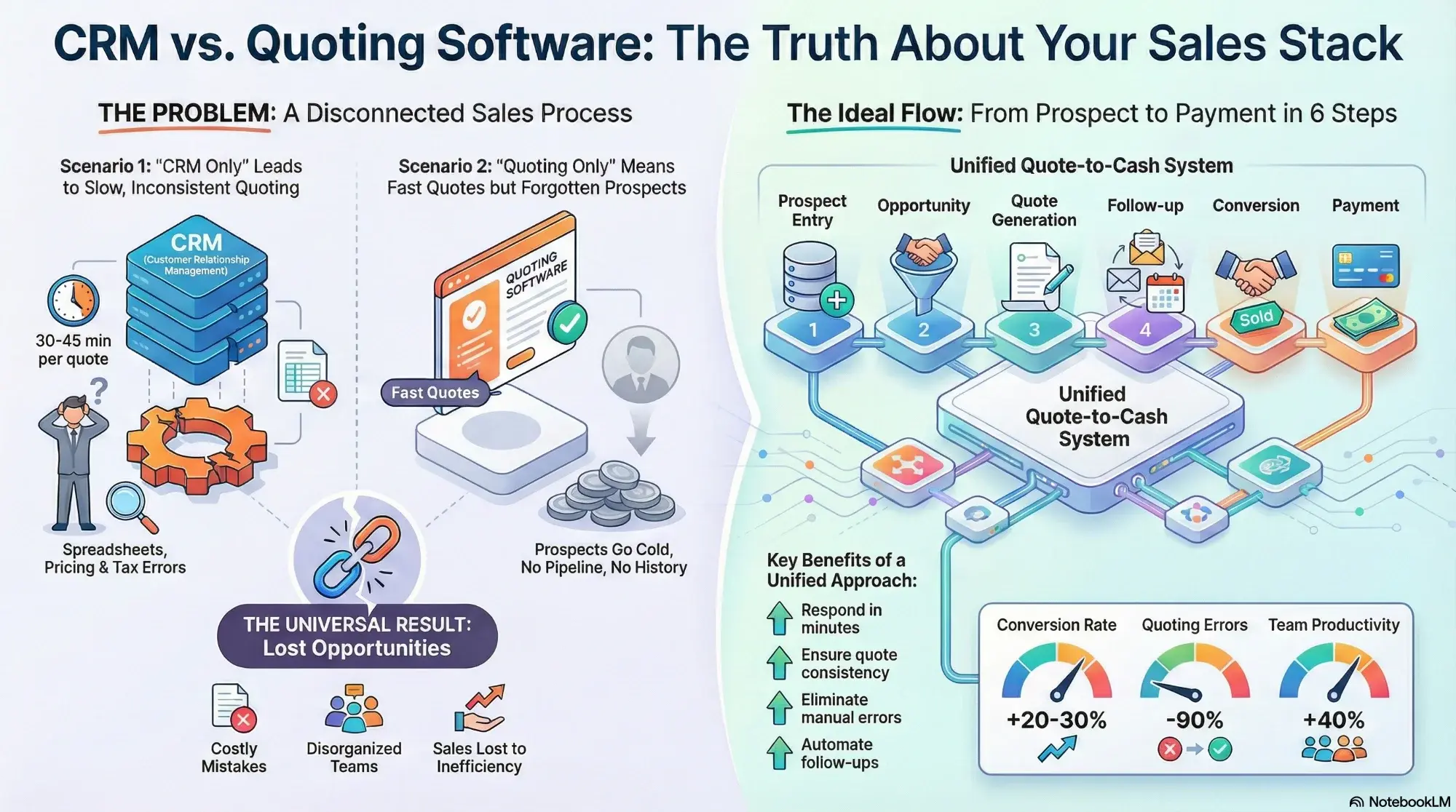
Visual comparison: CRM vs Quoting Software vs Unified System
Clear definitions
A CRM (Customer Relationship Management) system is for managing relationships with customers and prospects:
Quoting software is a specialized system for creating and managing commercial documents:
Where it breaks down
Many B2B companies find themselves in one of these three problematic scenarios:
✓ The good:
You know what prospects you have and at what stage
✗ The bad:
✓ The good:
You generate professional PDFs quickly
✗ The bad:
✓ The good:
Each tool works
✗ The bad:
CRM alone falls short
Most CRMs are optimized for tracking, not for quoting:
Time wasted: 30-45 minutes per quote in Excel
Inconsistency: Each salesperson formats differently
Errors: Manual calculations generate costly mistakes
Slowness: Client waits days for a response
Quoting alone falls short
Fast quoting doesn't help if you lose the prospect due to lack of follow-up:
Unified process
The complete B2B sales process you need:
From form, WhatsApp, referral, campaign or cold call
With prospect data, initial stage and assigned owner
From catalog/template with automatic calculations and professional format
System schedules automatic tasks and reminders based on response
One click converts quote to execution document (according to your process)
Record won/lost reason, analysis and learning
Side-by-side
Clearly understand what each tool solves and why you need both:
| Need | CRM | Quoting Software | Why it matters |
|---|---|---|---|
| Manage prospects and pipeline | Excellent | Limited | Without pipeline, no process control |
| History (calls, emails, notes) | Excellent | Sometimes | Avoid losing context and repeating conversations |
| Quote templates + catalog | Depends | Excellent | Quote fast and consistently |
| Versions and approval | Limited | Excellent | Reduce errors and disputes over "correct version" |
| Send via WhatsApp/email/PDF | Depends | Excellent | Speed up response and close |
| Conversion reports by stage | Excellent | Limited | Shows where sales are falling |
| Convert to order/invoice | Sometimes | Ideal | Reduce rework and speed up payment |
| Automatic post-quote follow-up | Depends | Ideal | Prevent prospects from going cold |
Unify prospects, quotes and follow-up in one place. No Excel, no duplication, no lost opportunities.
See Osmos in Action30-day trial • Unified Pipeline + Quotes • Setup in 1 hour • Support included
Three approaches
There are three typical approaches to connecting CRM and quoting:
CRM + quoting on same platform (Recommended)
Advantages:
Disadvantages:
Two tools connected via API or Zapier
Advantages:
Disadvantages:
Add the second later (common in growing companies)
Advantages:
Disadvantages:
The payoff
When you use CRM + Quoting correctly (ideally unified), you achieve:
From prospect to quote sent in minutes, not days. Less friction, more conversion.
Entire team uses same structure, rules and professional format without depending on Excel.
Prices, taxes and discounts calculated automatically without human errors.
System schedules reminders; no one "forgets" sent quotes.
Dashboard shows what's in pipeline and what's about to close this month.
From approved quote to order/invoice in one click (according to your operation).
Response time: From days to minutes
Conversion rate: +20-30% with systematic follow-up
Quoting errors: -90% with automation
Lost prospects: -60% with automatic reminders
Team productivity: +40% eliminating Excel
By industry
How different types of businesses combine CRM and quoting:
Need: Pipeline to manage multiple prospects + fast quotes with extensive catalog + automated volume discounts + version control per negotiation
Solution: CRM for tracking + quoting with catalog, discount rules and versions
Result: From 30 minutes to 3 minutes per quote; 4x more opportunities managed simultaneously
Need: Manage renewals and upgrades + quotes for scope changes + long conversation history + churn and expansion reports
Solution: CRM for renewals and expansion + quotes for changes and upgrades
Result: +25% in renewals through proactive follow-up; upgrade quotes in minutes
Need: Quotes with complex items, costs and logistics + clear validity periods + long pipeline + internal approval control
Solution: Pipeline for long cycle + detailed quotes with versions and clear validity
Result: -40% quoting time; +30% close rate through systematic follow-up
Need: Ultra-fast response + simple but professional quotes + automatic follow-up + fast conversion to sale
Solution: Fast quoting + automatic reminders + direct conversion to order
Result: From 1 hour to 5 minutes to send quote; +35% conversion through immediate follow-up
Need: Complete pipeline visibility + identify bottlenecks + conversion reports by stage + forecast closings
Solution: Unified dashboard with visual pipeline + analysis of quotes sent vs closed
Result: Clear identification of weak stages; corrective actions that improve conversion 20%
Personalized demo showing how to unify your pipeline and quotes in one system.
Schedule Demo Now30 days free • Setup in 1 hour • No credit card • Support included
The Osmos case
Osmos is designed for sales where quoting is the center of the process:
Osmos enables your team to operate with a clear flow: prospects → opportunities → quotes → close. More closed sales, less administrative time, team focused on selling.
Questions
Some CRMs include quoting features, but they are often basic. If you need catalog, templates, versions and complex rules, you need a robust quoting module.
Initially it may work, but as volume grows you need pipeline, history and follow-up to avoid losing prospects.
It works, but you must manage data duplication, integrations and template consistency to avoid rework.
If your bottleneck is quoting fast and well: start with quoting. If you already quote well but lack follow-up: prioritize CRM. Ideally unify soon.
If you lose sales due to lack of follow-up or inconsistent quotes, you already need CRM and a strong quoting system (ideally unified).
Osmos unifies prospects/opportunities, quotes and follow-up to close more without depending on Excel.
Yes, because WhatsApp speeds up conversation, but without a system follow-up fails. Quoting + reminders is key.
Takeaways
The simple truth: B2B selling requires two fundamental capabilities:
Trying to do just one is like trying to clap with one hand.
Over 200 B2B companies in Latin America have already unified their process with Osmos:
The best system is the one your team actually uses and that converts prospects into closed sales, not the one with the most features on the list. The investment pays back by closing one additional sale per month.