Trusted by 200+ businesses across the Americas




WhatsApp Sales
Complete guide with ready-to-copy templates and best practices to close more sales.
At a glance
Direct Answer: To create and send a quote via WhatsApp professionally, you need 3 things: (1) a clear quote (PDF or link), (2) a short message with the "next step" (approval or call), and (3) automatic follow-up so the prospect doesn't go cold.
The most effective method is: prepare the quote with template + catalog, export it as PDF (or generate a link), and send it via WhatsApp with text that includes summary, validity, and how to approve. Example flow: Prospect → Quote → Sent via WhatsApp → Follow-up (24h / 72h) → Approval → Invoice/Payment.
WhatsApp speeds up conversation, but many sales are lost because the quote stays "seen" and nobody follows up, or different versions get sent. With a quoting software like Osmos you can standardize templates, control versions, send quotes via WhatsApp (PDF or link), and activate reminders/tasks so every quote gets followed up until it's won or lost.
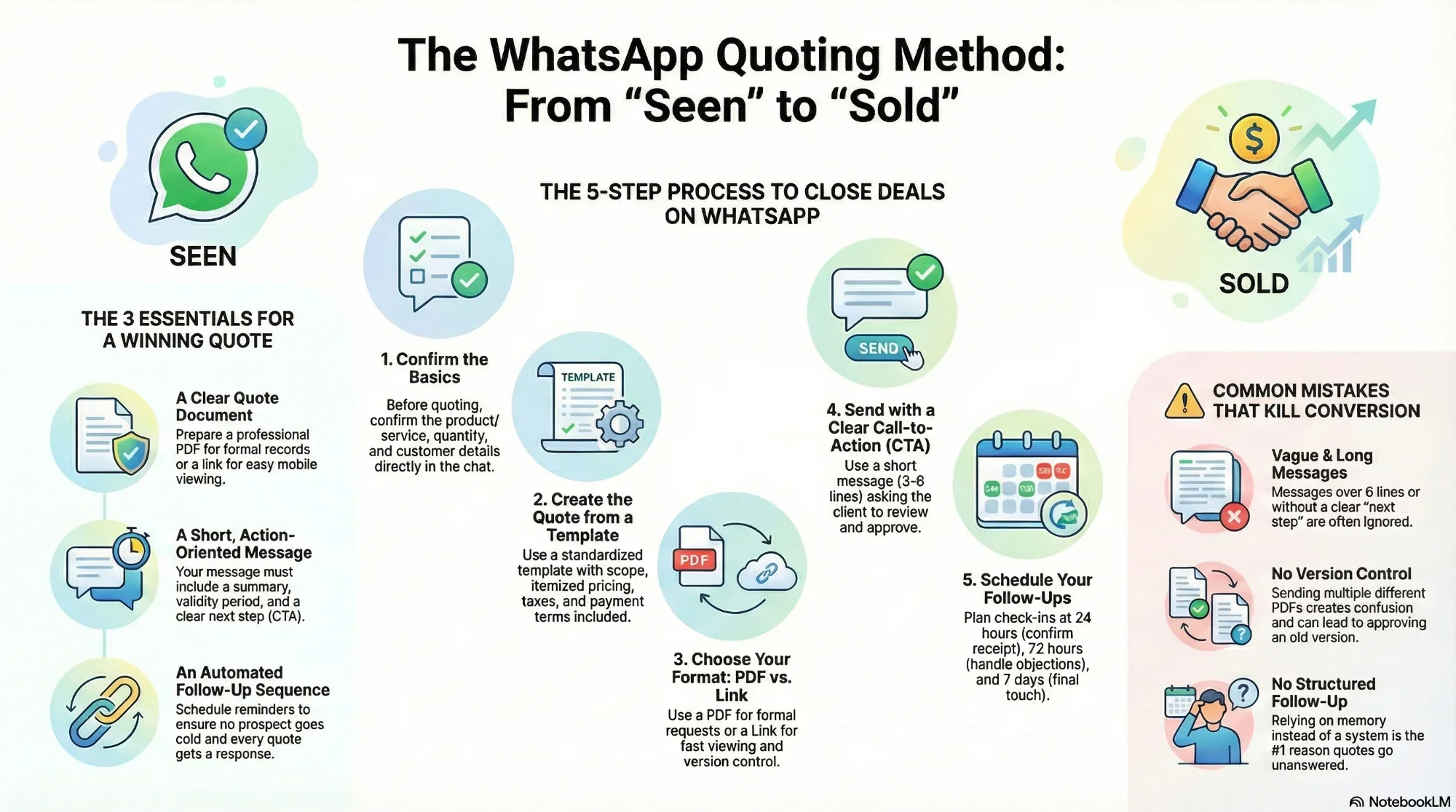
Complete process for sending and following up via WhatsApp
The basics
Sending a quote via WhatsApp means using WhatsApp as the primary channel to:
Why it works
Prospect sees it in minutes (98% open rate vs 20% email)
Especially in LATAM where WhatsApp is the preferred channel
Scope changes and adjustments in real-time
From days to hours with the right method
⚠️ But watch out: Without a method, you end up with "I'll send it again" + duplicate versions + cold prospects without follow-up.
Your workflow
Before creating the quote, confirm: specific product/service, quantity, and target date; city/delivery address if applicable; customer data (full name, company, email if required).
Use a standard structure that includes: detailed scope (what's included, what's not included); items with description, quantity, unit price, and subtotals; taxes and total clearly visible; payment terms and validity period.
These points prevent objections: delivery time (estimated date or availability); payment terms (deposit, on delivery, credit in days); price validity (example 7–15 days).
Choose format based on your case: PDF is ideal for formal procurement and when they need to archive; link is ideal for viewing from phone and avoiding duplicate versions.
Short message (3-6 lines) with: brief summary of product/service; total and validity; clear CTA: "Can you review it and confirm if we move forward today?" See ready-to-copy templates below ⬇️
Recommended follow-up calendar: 24 hours — receipt confirmation and questions; 72 hours — objections / closing attempt; 7 days — final touch before expiration.
Discover how Osmos automates quote follow-up sent via WhatsApp.
30-day trial • Send via WhatsApp • Automatic follow-up • Support included
Choose your format
What format works best for sending your quote via WhatsApp?
| Format | Advantages | Disadvantages | Recommended when... |
|---|---|---|---|
| PDF attachment | ✓ Very formal ✓ Easy to archive ✓ Can be printed |
✗ Duplicate versions ✗ Hard to update |
Procurement requires formal PDF / final quote |
| Quote link | ✓ Less confusion ✓ Version control ✓ "Viewed" tracking |
✗ Requires system that generates links | You want speed and version control |
| Text in chat | ✓ Very fast | ✗ Unprofessional ✗ Hard to audit |
Only very simple quotes (1-2 items) |
Copy & send
Use these templates to send and follow up on your quotes via WhatsApp:
When to use: First send after confirming details via chat
When to use: 24 hours after initial send if no response
When to use: 72 hours later, attempting to close or get objection
When to use: 1-2 days before validity expiration
💡 Pro tip: Personalize [Name] and details, but keep the short structure. Messages over 6 lines get ignored.
The payoff
Where it breaks down
Send different PDFs without control → customer approves old version
Get ignored; better 3-6 lines with clear CTA
Prospect doesn't know how to approve or what's next
Without WhatsApp Business you lose labels, hours, and organization
Relying on human memory = lost sales
By industry
Flow: Quote with catalog + volume discount → sent via WhatsApp → approval → payment/invoice
Result: From 40 minutes to 4 minutes per quote; +35% conversion with follow-up
Flow: Quote by scope → quick adjustment in chat → approval + deposit via transfer
Result: Close in 24-48 hours vs 7 days with email
Flow: Quote with production times + delivery → confirmation → formal order/invoice
Result: -60% last-minute changes through clear communication
With Osmos: templates, version control, and automatic follow-up.
30 days free • No credit card • Setup in 1 hour • Support included
Why Osmos
With Osmos and its CRM for quotes you can standardize the entire WhatsApp quoting process:
Customer stories
I really like the way Osmos creates quotes for me. It helps me keep a standard and neat presentation toward my clients.
What I like about Osmos is that it combines the CRM with the quotes in a seamless manner.
Questions
A brief summary, total, validity period, and next step (approve, schedule call, or pay deposit), plus the PDF or link. Use the templates on this page.
PDF when procurement requires a formal archived document; link when you want speed, version control, and avoid confusion.
Request explicit confirmation like "Reply APPROVED" or send a signature/payment link if applicable. The CTA must be crystal clear.
Recommended: 24 hours (confirmation), 72 hours (closing/objections), and before quote expiration.
Not mandatory, but it helps with labels, product catalog, business hours, and better conversation organization.
Long messages (over 6 lines), no clear CTA, no validity period, no payment terms, and no structured follow-up.
Osmos standardizes quotes, controls versions, and activates automatic follow-up so no quote goes unanswered or stays "seen".
Takeaways
Sending quotes via WhatsApp can dramatically speed up your sales process, but only if you have a clear method: standardized template, short message with CTA, and automatic follow-up.
Teams that master this process achieve:
Use the templates from this page, adapt the workflow to your business, and if you want to automate follow-up so no quote goes unanswered, Osmos lets you standardize templates, control versions, and activate automatic reminders.
Over 200 companies in Latin America already use Osmos to quote faster via WhatsApp and close more sales without depending on human memory.
Get started
With Osmos: templates, version control, and automatic follow-up.
30 days free • No credit card • Setup in 1 hour • Support included